




The P2E (PAYBACK 2 EMPLOYEES) motivation system is available online to all PAYBACK Employees and trainees, and its detailed rules are specified in the regulations.
Employees logged in the P2E system have the opportunity to collect PAYBACK Points:
- for an outstanding attitude, in line with our values of Focus, Cooperation and Efficiency,
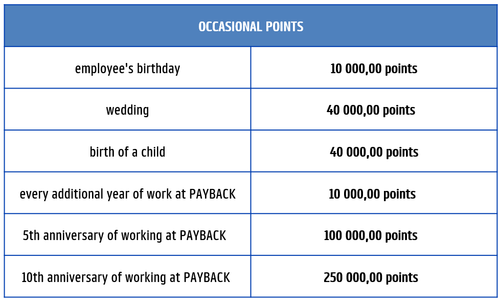
- for specific occasions:
QUESTIONS AND ANSWERS:
Access to the P2E system is given to each employee at the instant of employment, just after providing the HR team with the PAYBACK card number.
- Log in to the system via the P2E website P2E (payback.pl)
- Enter your login and password (Login: your email address, Password: set by yourself.)
If you forgot your password, go to P2E website P2E then use the option "Problem z logowaniem? Zresetuj swoje hasło". Wait patiently - the password will come to your mailbox within 24 hours.
Each quarter, Employees are entitled to distribute 10 000 PAYBACK points among other employees and trainees, in recognition of their outstanding attitude in line with our values:
FOCUS
We put Partners and consumers first, focus on key decisions and enforcement.
COLLABORATION
We work in open, cross-functional teams to achieve common goals.
EXECUTION
Everyone contributes to achieving business goals, and in addition, everyone needs to act with the 'mindset' of operational efficiency - so as to constantly improve the effectiveness of internal processes, because only than, time is freed to support partners and create new solutions for consumers.
The received PAYBACK Points are saved to the account in the P2E system. The employee has the opportunity to:
- transfer them to his/her (individual) PAYBACK account, which may involve the need to pay tax and contributions (according to the current legislation)
- use them for some activity (currently these are Multisport sport card, training which is individual choice).
Three steps are required:
- collect the appropriate amount of PB Points in your P2E account,
- by the 15th of the month, apply to use the collected Points to pay for the Multisport sport card - for this purpose, send an e-mail to: hr@payback.net,
Within 7 days you will receive feedback on the number of Points that will be collected from your P2E account and the amount that will be added to your salary in order to calculate and deduct the due tax and contributions.
- fill in a statement confirming your approval for charging your P2E account with the indicated number of points and agreement to add the indicated amount to your salary.
Four steps are required:
- collect the appropriate amount of PB Points in your P2E account (set manual overflow),
- by the 15th of the month, apply to use the collected Points to pay for the training - for this purpose, send an e-mail to: hr@payback.net,
- fill in a statement confirming your approval for charging your P2E account with the indicated number of points and agreement to add the indicated amount to your salary,
- fill out the cost settlement form in the Neula system, attaching the invoice.
Note: 10 000 points is 100 PLN. The amount you want to settle with points multiply by 100. For example, 212 PLN is 21 200 points.
The system sends automatic e-mail information about the points transferred to your account. After logging into the system, in the points history tab you see the number of points transferred and their type.
In the case of quarterly points, the justification is also available, while you will not receive information from whom the points were transferred. Unless the person transferring the points adds such information in the description.