





Adobe Analytics (formerly known as "Omniture")

New: Do you already know our Teams HELP Channel? There you can view and download articles and training materials on various topics.
What is Adobe Analytics?
Adobe Analytics is an enterprise solution on the analytics market: it forms the basis for comprehensive online marketing reporting across all channels, as the tool is highly customisable and can be linked with other online marketing tools.
Like other analytics tools, Adobe Analytics measures key figures such as visits, page views or visitors. In addition, the solution offers many more functionalities to expand and comprehensively analyse online channels.
How do I get access to Adobe Analytics?
Please send an email with the following information to PB_DigitalAnalytics@PAYBACK.net:
- First and last name
- Department and area (DE-AT-PL-MX-IT)
How can I get started and learn more about Adobe Analytics?
There are various training options:
Once you have gained access to Adobe Analytics (see How do I gain access to Adobe Analytics?), you can access the Adobe Experience League. Here Adobe provides training material in which the work with Adobe Analytics is explained from scratch.
There is also the possibility to interactively put what you have learned into practice with this tutorial dashboard!
How and where can I view Adobe Analytics reports that have already been created?
Ready-made reports help newcomers to quickly see KPIs and thus familiarise themselves with Adobe Analytics.
These reports can be accessed directly on the Adobe Analytics page.
For an overview, here is a list of existing reports.
How do I get access to the Payback Digital Analytics Wiki page?
To access the PAYBACK Global Digital Analytics Home wiki page, follow the steps below:
- Click on https://pb-iam.intra.loyaltypartner.com/ to go to the IAM tool. Log in with your Windows login.
- Then select Create Request from the menu bar. Or click directly on the link on the home screen.
- Now you can search for the following group in the search bar: confluence-global-dig-analytics-r
after access has been granted, other interesting wiki pages are highly recommended:
What does an ususal analysis look like in Adobe Analytics Workspace?
Example - Joker 2020 Game - Traffic Sources Analysis
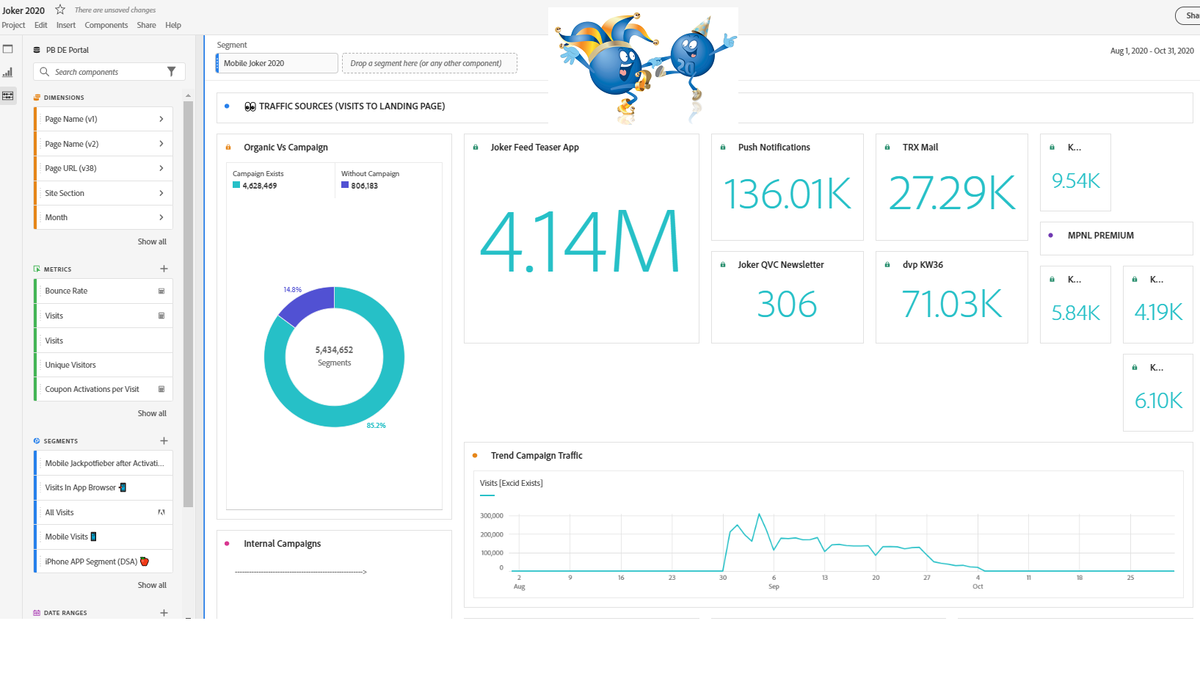
Important terms relating to Adobe Analytics:
- Page View: also page view, refers to the number of times a single web page is viewed with a web browser.
- Visit: describes the sequence of a group of pages viewed by a user on a website. A visit ends after 30 minutes of inactivity (or 12 hours of continuous activity) on the website.
- Unique Visitor: are the users of a website. This metric expresses how many people have visited a website over a given period of time. (Multiple visits by one person are not counted here).
- Bounce rate: also known as bounce rate, this is the percentage of visits that navigate away from the website after viewing a page.