





Phishing
Phishing describes an attempt to steal identifiers and passwords via the Internet by sending fake e-mails or SMS messages. Internet users are lured by cyber criminals to fake Internet sites of banks, online shops or other online services by means of deceptively genuine fake e-mails in order to get their user IDs and passwords. The data is used, for example, for account looting or hacker attacks on companies.
Phishing is derived from the words "password" and "fishing" for "fishing for password". Its purpose is to illegally "fish" internet users' access data and to use it for criminal acts to the detriment of the user. Phishing attacks often focus on access data for online banking. But also identifiers and passwords of mail accounts, online shops or social networks are often the target of phishing.
With the help of the gained access data, the phisher is able to take over the identity of his victim on the respective internet platform. This enables the phisher to inflict financial damage on the victim, damage his reputation or order goods under another person's name.
Tipps
PAYBACK , like many companies, is actively phished by attackers in the hope of accessing our network. Although we have many protective layers, some emails do slip in. This is why our colleagues are the number to defend against phishing.
Here are some tips to identify a phish:
- Spelling or grammatical errors
- Generic greeting or incorrect spelling of your name
- Making a threat
- Call to action, offer or reward
- Spoof of popular websites or companies
- Request for personal information
- Adress to link in the email doesn't match link typed in the message
- The email contains an attachement you weren't excepting
Before you click ask: Do you feel comfortable with the email?
The following tips will help you to detect and avoid a possible phishing attack:
- URLs - if you receive a mail with any URL link from an external party (e.g. customer, supplier, partner, etc.)
- Hover over the link and check the real target URL of the link
- if it is different from the sender address or a strange name don't click on it
- If you receive an attachement you don't excepted, don't click on it
- If you suspect you’ve received a phishing email, whether simulated or real – you should treat all phishing messages the same! – observe the following cautions:
- Do not click any links, enter your login credentials or open any attachments. Opening the email itself may not harm your computer, but performing any of these additional steps may result in exposing personal or company data.
- Report the attempted phish. How to report a phish will depend on your computing platform. Please reference yours below:
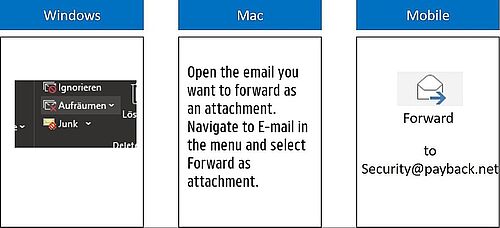
- If you see the plug-in, click on the “fish” icon to report the suspicious email, and the email will automatically be forwarded to the appropriate team for analysis.
- If you use Outlook Web App or Mac machine (which doesn’t support the plug-in) or if the plug-in is not visible on your tool bar, then manually forward the suspicious email to security@payback.net.
Quiz
You are welcome to do the phishing quizz from google if you like: https://phishingquiz.withgoogle.com/?hl=en-GB