



Printing
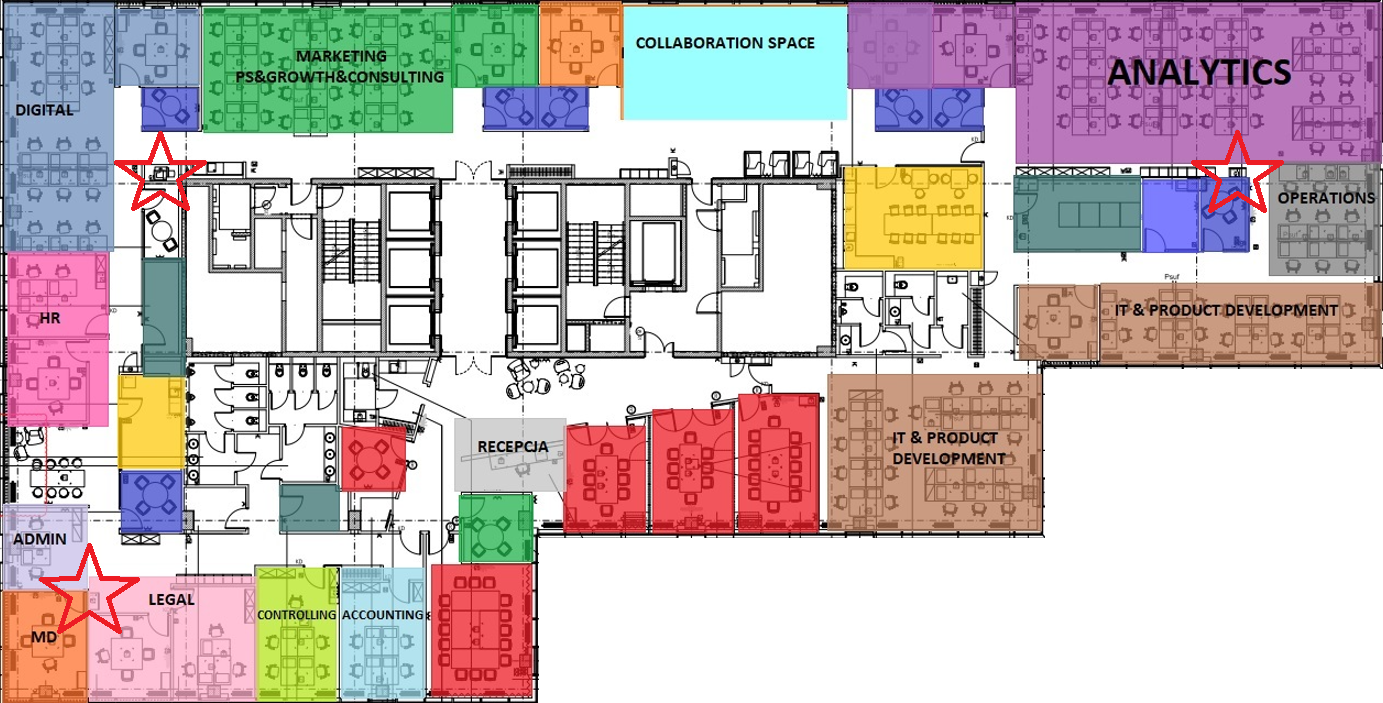
We have 3 public printers in our Warsaw office. Additional printers are provided for strategic departments that need to take care of data security, so they use room printers. On the map below, public access printers are marked with stars:
Printers are automatically connected when you log in to your computer on the internal office network. If the printers are not connected on your computer, make sure you are connected to the network by cable or via Wi-Fi "IWL" and then log out of your account and log back in.
All printers use a single print queue, which means that the file you send will be able to be printed on any printer in the office. Our print queues are named: "FollowMe_Color" and "FollowMe_BlackWhite".
You will access your account on the printer with an access card. The first time you use the printer, you will need to register the card by assigning your login to it. In the instructions below you will find a short tutorial on how to do this:
In public office printers it is possible to scan documents. Scanned documents are sent to the email of the logged-in account. Default single-sided scanning is available under the "Easy Scan - Email" tile. The "Panel Scan" option allows you to customize options such as format, two-sided scanning, color/gray scale.
If you need help with the use of the printer or despite going through the instructions you have trouble adding a card or scanning we invite you to contact the IT helpdesk.
Contact persons: Jacek Dziemian and Rafal Kubuj